


Appointment scheduling for service businesses, made simple

Designed for clinics, agencies, coaches, and local service teams









Everything you need to run appointments offline
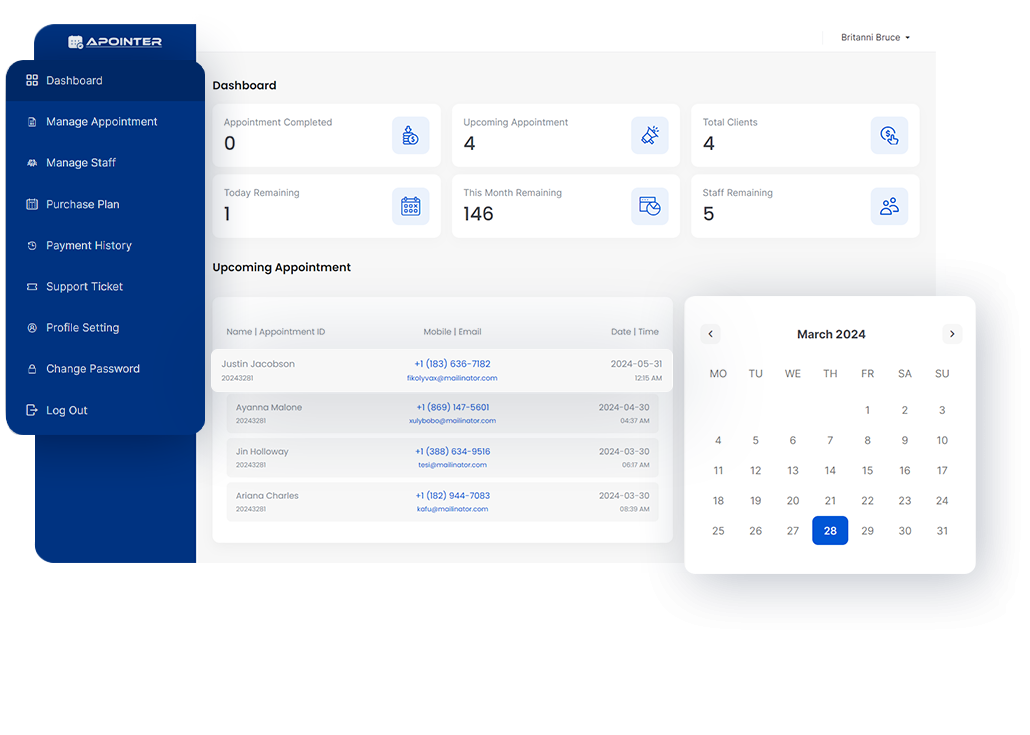
AppointWorks helps service businesses accept online bookings for offline meetings. Manage calendars, team schedules, client records, and appointment flow without complexity.
-
-
1 Link
Public Booking Page -
5 / Day
Trial Daily Appointments -
30 Total
Trial Appointment Cap
Core features built for real appointment workflows

Public booking link
Share one public URL so clients can pick a date and only available slots. Booked slots are automatically unavailable.

Availability control
Define working days, working hours, and slot intervals so your calendar reflects your real schedule.

Client management
Keep client details and appointment history in one place for faster follow-up and better service continuity.

Subscription billing
Offer monthly or yearly plans with a clear free trial path before paid subscription starts.

Calendar integrations
Sync appointments with Google Calendar, Outlook, Office 365, and Exchange when integrations are enabled.

Staff & permissions
Manage staff access and roles so each team member works with the right visibility and permissions.

Branding options
Add your logo and publish a branded booking page that matches your business identity.

Notifications & updates
Track booking activity with dashboard notifications and clear appointment status updates.
Simple pricing for teams that manage appointments
Start with a 15-day free trial, then choose monthly or yearly billing when you are ready to scale.
BASIC
$19.00 /month
$189.00 / yearly
- Staff add limit: 3
- Daily appointment: 15
- Monthly appointment: 450
BASIC
- Staff Limit: 3
- Daily Appointment Limit: 15
- Monthly Appointment Limit: 450
ADVANCED
$39.00 /month
$389.00 / yearly
- Staff add limit: 10
- Daily appointment: 40
- Monthly appointment: 1200
ADVANCED
- Staff Limit: 10
- Daily Appointment Limit: 40
- Monthly Appointment Limit: 1200
Why businesses switch to AppointWorks
Reduce no-shows, save admin time, and keep your booking operations organized across your team.
-
Fewer scheduling conflicts
Real availability control reduces double booking and manual back-and-forth with clients.
-
Better booking experience
Clients can book quickly from your public page while your team keeps full control of availability.


Built for service-based businesses

Medical & Wellness

Agencies & Consultants

Freelancers

Legal Services

Beauty & Personal Care

Coaches & Trainers

Financial Services

Education & Tutoring
What users say about AppointWorks
By John Doe
AppointWorks has truly transformed the way I manage appointments for my business. With its intuitive interface and robust features, scheduling appointments has become a breeze. I can easily set up appointments, manage my calendar, and even send automated reminders to clients.
By David Smith
As a busy professional, I rely on AppointWorks to keep my schedule organized, and it hasn't disappointed. The platform is incredibly user-friendly, allowing me to quickly book appointments, sync my calendar across devices, and access important client information on the go.
By Alex Hae
AppointWorks has been a lifesaver for my small business. It's packed with all the features I need to efficiently manage appointments and streamline my workflow. I love how customizable it is—I can tailor it to fit my specific needs and branding. Plus, the ability to accept online bookings has been a game-changer.
By Steve Warn
AppointWorks has simplified my appointment management process like never before. The seamless integration with my existing systems and tools has made the transition effortless. I particularly appreciate the automation features like reminders and follow-ups, which have helped me stay organized.
Frequently Asked Questions
AppointWorks is an appointment scheduling SaaS for service businesses. It helps you publish a booking link, manage availability, and track appointments in one dashboard.
Yes. Clients book online through your public page, and the meeting happens offline (in person or at your location).
Yes. Each user can publish a personal booking link and choose available slots based on configured calendar availability.
Yes. AppointWorks supports integration with Google Calendar, Outlook, Office 365, and Exchange when enabled by the admin.
Yes. New accounts can start with a 15-day free trial including 1 staff account, up to 5 appointments per day, and 30 appointments total during trial.

Guides and updates
Practical articles about appointment operations, availability setup, and scheduling best practices.

28 Oct 2020
Top 5 Features Your Offline Booking SaaS Must Include
If your service happens offline, your booking software must do more than display a calendar. It must protect real availability and reduce admin overhead.1. Public booking link per userEvery account sh...
Read More
25 Jan 2024
Why Service Businesses Lose Revenue Without Structured Scheduling
Scheduling quality impacts revenue directly. Most losses come from no-shows, planning conflicts, and slow booking response.Reduce missed appointmentsAutomated reminders and clear status updates protec...
Read More
31 Jan 2024
How to Launch Your AppointWorks Booking Page in 20 Minutes
You can be live quickly if setup is done in the right order.Step 1: Complete profile and brandingAdd business details and logo for a consistent client-facing page.Step 2: Enable your public booking li...
Read More
31 Jan 2024
What to Automate First in Your Appointment Workflow
Start automation where manual errors are most expensive.Instant confirmationsSend confirmation immediately after booking to prevent client uncertainty.Reminder sequencesUse pre-appointment reminders t...
Read More
31 Jan 2024
Security Checklist for Team-Based Appointment Platforms
Security in scheduling platforms is mostly about permissions, traceability, and safe configuration boundaries.Use role-based accessStaff should access only what they need for daily execution.Protect a...
Read More
27 Mar 2024
What Comes Next for AppointWorks Booking Operations
The next phase of scheduling software is operational clarity at scale.More actionable dashboardsTeams need immediate visibility on load, slot pressure, and no-show trends.Stronger calendar sync reliab...
Read More